HTML / CSS / JS

ホバー
 2026/02/25
 2026/2/17
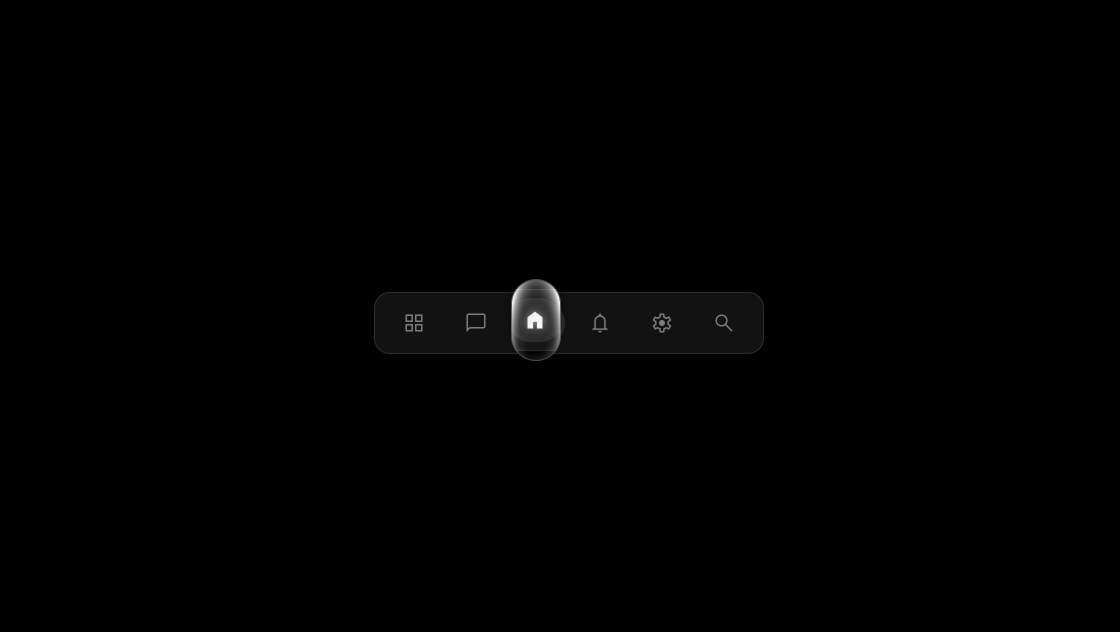
ただ色が変わるだけのメニューでは物足りない。
このサンプルは、選択されたアイコンを囲む“光る枠”がなめらかに移動し、操作に応じて自然に追従するアニメーションメニューです。
ホバーやクリックに反応して、視線を気持ちよく誘導します。
<div class="kumonosu-container">
	<div class="kumonosu-action-bar">
		<button>
			<span class="kumonosu-material-symbols-outlined">grid_view</span>
		</button>
		<button>
			<span class="kumonosu-material-symbols-outlined">chat_bubble</span>
		</button>
		<button class="kumonosu-selected">
			<span class="kumonosu-material-symbols-outlined">home</span>
		</button>
		<button>
			<span class="kumonosu-material-symbols-outlined">notifications</span>
		</button>
		<button>
			<span class="kumonosu-material-symbols-outlined">settings</span>
		</button>
		<button>
			<span class="kumonosu-material-symbols-outlined">search</span>
		</button>
	</div>
	<div class="kumonosu-anchored-pointer"></div>
	<svg width="0" height="0" style="position: absolute;">
		<filter id="kumonosu-filter" color-interpolation-filters="linearRGB" filterUnits="objectBoundingBox" primitiveUnits="userSpaceOnUse">
			<feDisplacementMap in="SourceGraphic" in2="SourceGraphic" scale="5" xChannelSelector="A" yChannelSelector="A" x="5" y="-5" width="100%" height="100%" result="displacementMap" />
		</filter>
	</svg>
</div>@import url("https://fonts.googleapis.com/css2?family=Material+Symbols+Outlined:opsz,wght,FILL,GRAD@20..48,100..700,0..1,-50..200");
:root {
--spring-easing: linear(0, 0.0018, 0.0069 1.15%, 0.026 2.3%, 0.0637, 0.1135 5.18%, 0.2229 7.78%, 0.5977 15.84%, 0.7014, 0.7904, 0.8641, 0.9228, 0.9676 28.8%, 1.0032 31.68%, 1.0225, 1.0352 36.29%, 1.0431 38.88%, 1.046 42.05%, 1.0448 44.35%, 1.0407 47.23%, 1.0118 61.63%, 1.0025 69.41%, 0.9981 80.35%, 0.9992 99.94%);
}
/* bodyはリセットのみ */
body {
margin: 0;
padding: 0;
}
/* 全体を囲うコンテナ */
.kumonosu-container {
background-color: #000;
display: flex;
justify-content: center;
align-items: center;
height: 100vh;
width: 100%;
font-family: sans-serif;
position: relative;
}
.kumonosu-anchored-pointer {
position: absolute;
position-anchor: --kumonosu-selected;
top: anchor(top);
left: anchor(left);
width: 3rem;
height: 5rem;
margin-top: calc(anchor-size(height) * -0.5);
display: block;
background: none;
border: 1px solid rgba(255, 255, 255, 0.3);
border-radius: 2rem;
transition: none;
filter: drop-shadow(0 3px 6px black);
pointer-events: none;
overflow: hidden;
backdrop-filter: url(#kumonosu-filter);
opacity: 0;
&::before {
content: '';
position: absolute;
inset: 0;
background: radial-gradient(1rem 3rem ellipse at 50% 85% in oklch, oklch(100% 0 0 / 0%) 10% 50%, 150%, oklch(100% 0 0 / 100%) 175% 165%), radial-gradient(2rem 3.5rem ellipse at 45% 35% in oklch, oklch(0% 0 0 / 0%) 80%, gray 150%);
}
}
/* 準備完了後に動きを有効化 */
.kumonosu-ready .kumonosu-anchored-pointer {
transition: all 1s var(--spring-easing);
opacity: 1;
}
.kumonosu-action-bar {
display: flex;
align-items: center;
background-color: #111;
border: 1px solid #333;
border-radius: 1rem;
padding: 0.5rem;
box-shadow: 0 4px 20px rgba(0, 0, 0, 0.5);
position: relative;
}
button {
position: relative;
padding: 10px 15px;
display: flex;
align-items: center;
justify-content: center;
border: none;
background: none;
border-radius: 50px;
margin: 0 4px;
cursor: pointer;
color: #888;
transition: background-color 0.3s ease, color 0.3s ease;
}
.kumonosu-material-symbols-outlined {
background: none;
transition: filter 0.1s ease;
font-family: 'Material Symbols Outlined';
font-weight: normal;
font-style: normal;
line-height: 1;
letter-spacing: normal;
text-transform: none;
display: inline-block;
white-space: nowrap;
word-wrap: normal;
direction: ltr;
-webkit-font-feature-settings: 'liga';
-webkit-font-smoothing: antialiased;
}
button:hover,
button:focus {
background-color: #222;
}
button:focus {
outline: none;
}
.kumonosu-selected {
background-color: #333;
color: #fff;
}
.kumonosu-selected:hover,
.kumonosu-selected:focus {
background-color: #333;
}
.kumonosu-selected .kumonosu-material-symbols-outlined {
filter: drop-shadow(0 0 4px rgba(255, 255, 255, 0.5));
}
button::before {
content: '';
position: absolute;
inset: -0.4rem;
}
.kumonosu-material-symbols-outlined {
font-size: 24px;
font-variation-settings: 'FILL' 0, 'wght' 300, 'GRAD' 0, 'opsz' 24;
}
.kumonosu-selected .kumonosu-material-symbols-outlined {
font-variation-settings: 'FILL' 1, 'wght' 300, 'GRAD' 0, 'opsz' 24;
}const container = document.querySelector('.kumonosu-container');
const buttons = container.querySelectorAll('button');
let selectedButton = container.querySelector('.kumonosu-selected');
const setAnchorOnSelected = () => {
if (selectedButton) {
selectedButton.style.anchorName = '--kumonosu-selected';
}
};
setAnchorOnSelected();
requestAnimationFrame(() => {
requestAnimationFrame(() => {
container.classList.add('kumonosu-ready');
});
});
buttons.forEach(button => {
button.addEventListener('click', () => {
if (selectedButton) {
selectedButton.classList.remove('kumonosu-selected');
selectedButton.style.anchorName = '';
}
selectedButton = button;
selectedButton.classList.add('kumonosu-selected');
setAnchorOnSelected();
});
const handleInteractionStart = () => {
if (button !== selectedButton) {
if (selectedButton) {
selectedButton.style.anchorName = '';
}
button.style.anchorName = '--kumonosu-selected';
}
};
button.addEventListener('mouseenter', handleInteractionStart);
button.addEventListener('focus', handleInteractionStart);
const handleInteractionEnd = () => {
if (button !== selectedButton) {
button.style.anchorName = '';
setAnchorOnSelected();
}
};
button.addEventListener('mouseleave', handleInteractionEnd);
button.addEventListener('blur', handleInteractionEnd);
});このメニューは、選択されたボタンに anchor-name を付与し、枠側を position-anchor で追従させる仕組みです。
JavaScriptでクラスとアンカーを切り替えることで、枠がスムーズに移動します。
主な仕組みは次の通りです。
anchor-positioning を使って枠を選択ボタンに固定@property とカスタムイージングで滑らかな移動を実現単なる背景色変更ではなく、「選択状態そのものが動く」ような視覚体験を作る構造になっています。
見た目や動きの印象は、いくつかのプロパティを調整するだけで簡単に変更できます。
.kumonosu-anchored-pointer の width / heightborder-radius--spring-easing の値を変更::before のグラデーション調整特に --spring-easing を変更すると、軽やかな動きにも、重みのある動きにも変えられます。ブランドイメージに合わせて調整しやすい設計です。
anchor-positioning は比較的新しいCSS仕様のため、対応ブラウザが限られます。
古い環境では正しく動作しない可能性があります。
また、backdrop-filter や filter を使用しているため、端末やブラウザによってはパフォーマンスに差が出ることがあります。実装前には対象環境での動作確認をおすすめします。