HTML / CSS / JS

ビジュアル
 2026/02/03
 2026/1/30
滑らかに溶け合い、触れると揺らぐ。
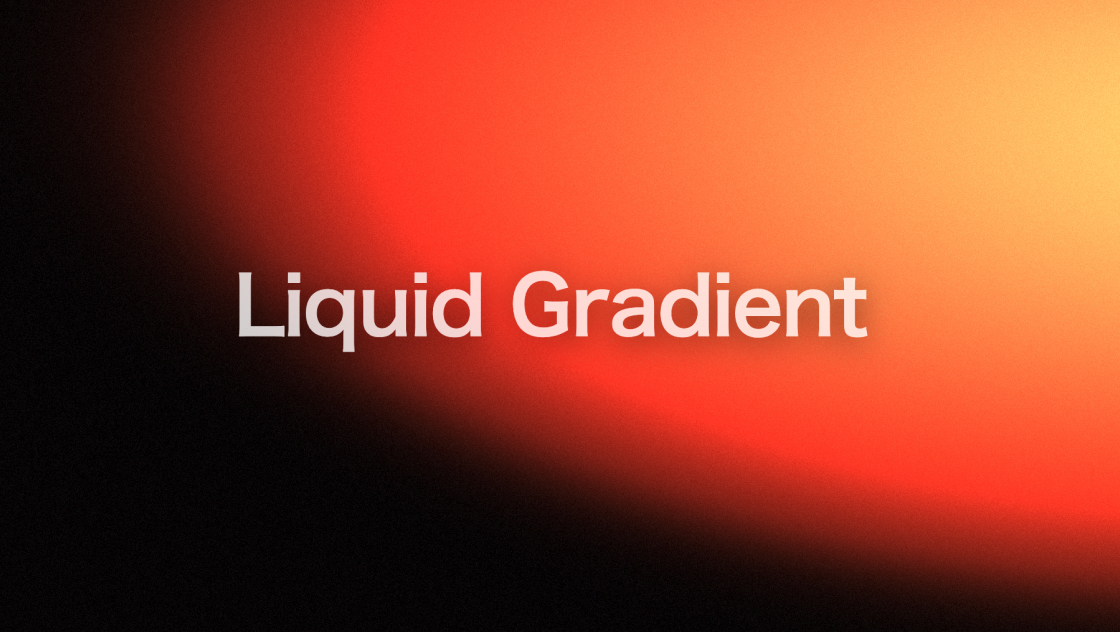
そんな「液体のような質感」をWeb上で表現するには、単純なCSSグラデーションだけでは限界があります。
本デモでは、JavaScriptとWebGLを用い、マウスの動きに反応して歪みが広がるリキッドグラデーションを実装しました。
時間変化と操作入力を組み合わせることで、静的な背景では得られない有機的な動きを表現しています。
<h1 class="heading">Liquid Gradient</h1>
<div class="custom-cursor" id="customCursor"></div>* {
margin: 0;
padding: 0;
box-sizing: border-box;
}
body {
overflow: hidden;
font-family: sans-serif;
background-color: #050000;
cursor: none;
/* デフォルトのカーソルを非表示 */
}
#webGLApp {
position: fixed;
top: 0;
left: 0;
width: 100%;
height: 100%;
z-index: 1;
}
.heading {
position: fixed;
top: 50%;
left: 50%;
transform: translate(-50%, -50%);
z-index: 10;
color: white;
text-align: center;
white-space: nowrap;
pointer-events: none;
font-family: "Syne", sans-serif;
font-size: clamp(3rem, 8vw, 8rem);
font-weight: 700;
letter-spacing: -0.02em;
line-height: 1;
text-shadow: 0 10px 50px rgba(0, 0, 0, 0.6);
opacity: 0.8;
}
/* カスタムカーソル:ただの丸に変更 */
.custom-cursor {
position: fixed;
width: 30px;
height: 30px;
border: 1.5px solid rgba(255, 255, 255, 0.8);
border-radius: 50%;
pointer-events: none;
z-index: 1000;
transform: translate(-50%, -50%);
transition: width 0.2s ease, height 0.2s ease;
will-change: transform;
}class TouchTexture {
constructor() {
this.size = 64;
this.width = this.height = this.size;
this.maxAge = 64;
this.radius = 0.25 * this.size;
this.speed = 1 / this.maxAge;
this.trail = [];
this.last = null;
this.initTexture();
}
initTexture() {
this.canvas = document.createElement("canvas");
this.canvas.width = this.width;
this.canvas.height = this.height;
this.ctx = this.canvas.getContext("2d");
this.ctx.fillStyle = "black";
this.ctx.fillRect(0, 0, this.canvas.width, this.canvas.height);
this.texture = new THREE.Texture(this.canvas);
}
update() {
this.ctx.fillStyle = "black";
this.ctx.fillRect(0, 0, this.canvas.width, this.canvas.height);
for (let i = this.trail.length - 1; i >= 0; i--) {
const point = this.trail[i];
let f = point.force * this.speed * (1 - point.age / this.maxAge);
point.x += point.vx * f;
point.y += point.vy * f;
point.age++;
if (point.age > this.maxAge) this.trail.splice(i, 1);
else this.drawPoint(point);
}
this.texture.needsUpdate = true;
}
addTouch(point) {
let force = 0, vx = 0, vy = 0;
if (this.last) {
const dx = point.x - this.last.x, dy = point.y - this.last.y;
if (dx === 0 && dy === 0) return;
const dd = dx * dx + dy * dy;
let d = Math.sqrt(dd);
vx = dx / d; vy = dy / d;
force = Math.min(dd * 20000, 2.0);
}
this.last = { x: point.x, y: point.y };
this.trail.push({ x: point.x, y: point.y, age: 0, force, vx, vy });
}
drawPoint(point) {
const pos = { x: point.x * this.width, y: (1 - point.y) * this.height };
let intensity = point.age < this.maxAge * 0.3 ?
Math.sin((point.age / (this.maxAge * 0.3)) * (Math.PI / 2)) :
-(1 - (point.age - this.maxAge * 0.3) / (this.maxAge * 0.7)) * ((1 - (point.age - this.maxAge * 0.3) / (this.maxAge * 0.7)) - 2);
intensity *= point.force;
let color = `${((point.vx + 1) / 2) * 255}, ${((point.vy + 1) / 2) * 255}, ${intensity * 255}`;
let offset = this.size * 5;
this.ctx.shadowOffsetX = this.ctx.shadowOffsetY = offset;
this.ctx.shadowBlur = this.radius;
this.ctx.shadowColor = `rgba(${color},${0.2 * intensity})`;
this.ctx.beginPath();
this.ctx.fillStyle = "rgba(255,0,0,1)";
this.ctx.arc(pos.x - offset, pos.y - offset, this.radius, 0, Math.PI * 2);
this.ctx.fill();
}
}
class GradientBackground {
constructor(sceneManager) {
this.sceneManager = sceneManager;
this.uniforms = {
uTime: { value: 0 },
uResolution: { value: new THREE.Vector2(window.innerWidth, window.innerHeight) },
uColor1: { value: new THREE.Vector3(0.6, 0, 0) },
uColor2: { value: new THREE.Vector3(0.4, 0, 0) },
uColor3: { value: new THREE.Vector3(0.5, 0.05, 0) },
uSpeed: { value: 0.6 },
uIntensity: { value: 1.1 },
uTouchTexture: { value: null },
uGrainIntensity: { value: 0.04 },
uDarkBase: { value: new THREE.Vector3(0.01, 0, 0) },
uGradientSize: { value: 0.65 },
uGradientCount: { value: 8.0 }
};
}
init() {
const vs = this.sceneManager.getViewSize();
const material = new THREE.ShaderMaterial({
uniforms: this.uniforms,
vertexShader: `varying vec2 vUv; void main() { gl_Position = projectionMatrix * modelViewMatrix * vec4(position, 1.0); vUv = uv; }`,
fragmentShader: `
uniform float uTime; uniform vec3 uColor1, uColor2, uColor3, uDarkBase;
uniform float uSpeed, uIntensity, uGrainIntensity, uGradientSize, uGradientCount;
uniform sampler2D uTouchTexture; varying vec2 vUv;
float grain(vec2 uv, float t) { return (fract(sin(dot(uv + t, vec2(12.9898, 78.233))) * 43758.5453) * 2.0 - 1.0); }
void main() {
vec2 uv = vUv;
vec4 touch = texture2D(uTouchTexture, uv);
uv -= (touch.rg * 2.0 - 1.0) * 0.35 * touch.b;
vec3 color = vec3(0.0);
for(int i=0; i<10; i++) {
if(float(i) >= uGradientCount) break;
float fi = float(i);
vec2 center = vec2(0.5 + sin(uTime * uSpeed * (0.15 + fi*0.02)) * 0.45, 0.5 + cos(uTime * uSpeed * (0.2 + fi*0.02)) * 0.45);
float influence = 1.0 - smoothstep(0.0, uGradientSize, length(uv - center));
vec3 c = (mod(fi, 3.0) == 0.0) ? uColor1 : (mod(fi, 3.0) == 1.0) ? uColor2 : uColor3;
color += c * influence * (0.8 + 0.2 * sin(uTime + fi));
}
color *= uIntensity;
color = mix(uDarkBase, color, smoothstep(0.0, 0.6, length(color)));
color += grain(vUv, uTime) * uGrainIntensity;
gl_FragColor = vec4(clamp(color, 0.0, 1.0), 1.0);
}
`
});
this.mesh = new THREE.Mesh(new THREE.PlaneGeometry(vs.width, vs.height), material);
this.sceneManager.scene.add(this.mesh);
}
hslToRgb(h, s, l) {
let r, g, b;
const hue2rgb = (p, q, t) => {
if (t < 0) t += 1; if (t > 1) t -= 1;
if (t < 1/6) return p + (q - p) * 6 * t;
if (t < 1/2) return q;
if (t < 2/3) return p + (q - p) * (2/3 - t) * 6;
return p;
};
const q = l < 0.5 ? l * (1 + s) : l + s - l * s;
const p = 2 * l - q;
r = hue2rgb(p, q, h + 1/3); g = hue2rgb(p, q, h); b = hue2rgb(p, q, h - 1/3);
return new THREE.Vector3(r, g, b);
}
update(delta) {
this.uniforms.uTime.value += delta;
const time = this.uniforms.uTime.value;
// 赤色から変化し始めるまでの時間を短縮 (5秒)
const holdDuration = 5.0;
// 色の変化速度を少し上げる (0.01)
const transitionSpeed = 0.01;
const hueShift = Math.max(0, (time - holdDuration)) * transitionSpeed;
this.uniforms.uColor1.value.copy(this.hslToRgb((hueShift) % 1.0, 0.85, 0.35));
this.uniforms.uColor2.value.copy(this.hslToRgb((hueShift + 0.03) % 1.0, 0.75, 0.25));
this.uniforms.uColor3.value.copy(this.hslToRgb((hueShift - 0.03) % 1.0, 0.85, 0.3));
}
}
class App {
constructor() {
this.renderer = new THREE.WebGLRenderer({ antialias: true });
this.renderer.setSize(window.innerWidth, window.innerHeight);
this.renderer.setPixelRatio(Math.min(window.devicePixelRatio, 2));
document.body.appendChild(this.renderer.domElement);
this.camera = new THREE.PerspectiveCamera(45, window.innerWidth/window.innerHeight, 0.1, 1000);
this.camera.position.z = 50;
this.scene = new THREE.Scene();
this.clock = new THREE.Clock();
this.touchTexture = new TouchTexture();
this.gradientBackground = new GradientBackground(this);
this.gradientBackground.uniforms.uTouchTexture.value = this.touchTexture.texture;
this.init();
}
init() {
this.gradientBackground.init();
this.tick();
window.addEventListener("resize", () => {
this.camera.aspect = window.innerWidth / window.innerHeight;
this.camera.updateProjectionMatrix();
this.renderer.setSize(window.innerWidth, window.innerHeight);
const vs = this.getViewSize();
this.gradientBackground.mesh.geometry.dispose();
this.gradientBackground.mesh.geometry = new THREE.PlaneGeometry(vs.width, vs.height);
});
window.addEventListener("mousemove", (e) => this.touchTexture.addTouch({ x: e.clientX/window.innerWidth, y: 1 - e.clientY/window.innerHeight }));
}
getViewSize() {
const h = Math.abs(this.camera.position.z * Math.tan((this.camera.fov * Math.PI / 180)/2) * 2);
return { width: h * this.camera.aspect, height: h };
}
tick() {
const delta = Math.min(this.clock.getDelta(), 0.1);
this.touchTexture.update();
this.gradientBackground.update(delta);
this.renderer.render(this.scene, this.camera);
requestAnimationFrame(() => this.tick());
}
}
new App();
const cursor = document.getElementById("customCursor");
document.addEventListener("mousemove", (e) => {
cursor.style.left = e.clientX + "px";
cursor.style.top = e.clientY + "px";
});https://cdnjs.cloudflare.com/ajax/libs/three.js/r128/three.min.js本デモは、Three.js を使ってWebGLの描画環境を構築し、フルスクリーンのプレーンに対してフラグメントシェーダで描画しています。
背景のグラデーションは複数の色の影響領域を重ね合わせることで構成されており、時間経過によってそれぞれがゆっくりと移動します。
これにより、常に形が変化する流動的な表現を実現しています。
マウス操作は、Canvas上に描画した動的テクスチャとして管理され、シェーダ内でUV座標を歪ませるための入力として使用されています。
マウスの移動情報は「タッチテクスチャ」として蓄積され、その強さや方向に応じて、グラデーション全体が押し流されるように変形します。
単に位置を追従させるのではなく、速度・方向・減衰を含めて計算することで、液体をかき混ぜたような自然な揺らぎを作り出しています。
初期状態では暗めの赤を基調とし、時間の経過とともに色相がゆっくりと変化するよう設計されています。
また、わずかなノイズ(グレイン)を加えることで、完全にフラットにならず、映像的な質感を持たせています。
以下のパラメータを調整することで、見た目や挙動を変更できます。
uColor1、uColor2、uColor3 を変更することで、全体のカラートーンを調整できます。uSpeed を変更すると、グラデーションの流動速度が変わります。uGrainIntensity を調整することで、映像的なノイズの量を制御できます。WebGLとシェーダを使用しているため、端末やGPU性能によっては描画負荷が高くなる場合があります。
また、マウス操作を前提とした表現のため、タッチデバイスでは挙動が異なって感じられる点に注意が必要です。
必要に応じてタッチ入力向けの調整を行ってください。
WebGLとシェーダを活用することで、CSSでは難しい流体的なグラデーション表現が可能になります。
本デモは、背景表現に動きと触感を加えたい場合のひとつの実装例としてまとめています。