HTML / CSS / JS

アニメーション
 2026/02/01
 2026/1/28
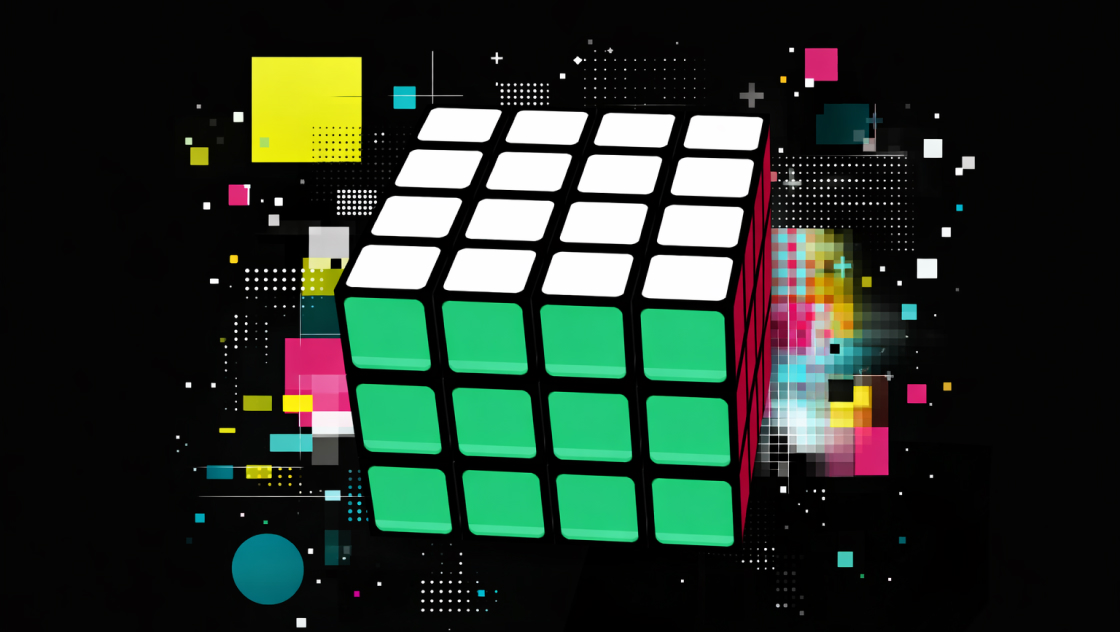
立体オブジェクトを表示するだけでなく、「触って操作できる」ことが伝わるかどうかは、体験の質を大きく左右します。
本デモでは、Three.jsを用いてルービックキューブを立体的に描画し、マウスやタッチ操作によって、実際に回して遊べるインタラクションを実装しました。
単なる3D表現ではなく、操作感と視認性の両立を重視した構成になっています。
<div id="kumonosu-ui">
    <h1 class="kumonosu-title">Rubik's Cube</h1>
</div>
<div id="kumonosu-controls">
    <button id="kumonosu-shuffle-btn" class="kumonosu-btn">Shuffle</button>
    <button id="kumonosu-solve-btn" class="kumonosu-btn">Solve</button>
    <button id="kumonosu-reset-btn" class="kumonosu-btn">Reset</button>
</div>
<div id="kumonosu-game-container"></div>body {
margin: 0;
overflow: hidden;
background: #050505;
font-family: 'Segoe UI', 'Hiragino Kaku Gothic ProN', sans-serif;
user-select: none;
}
#kumonosu-game-container {
width: 100vw;
height: 100vh;
cursor: grab;
}
#kumonosu-game-container:active {
cursor: grabbing;
}
#kumonosu-ui {
position: absolute;
top: 5%;
text-align: center;
width: 100%;
pointer-events: none;
color: white;
}
.kumonosu-title {
font-size: 2rem;
font-weight: 900;
letter-spacing: 0.3rem;
opacity: 0.7;
margin-bottom: 10px;
text-transform: uppercase;
}
#kumonosu-controls {
position: absolute;
bottom: 8%;
width: 100%;
display: flex;
justify-content: center;
gap: 15px;
pointer-events: none;
flex-wrap: wrap;
}
.kumonosu-btn {
pointer-events: auto;
padding: 12px 20px;
font-size: 0.85rem;
font-weight: bold;
color: white;
background: rgba(255, 255, 255, 0.1);
border: 1px solid rgba(255, 255, 255, 0.3);
border-radius: 30px;
cursor: pointer;
backdrop-filter: blur(5px);
transition: all 0.3s ease;
text-transform: uppercase;
letter-spacing: 0.1rem;
outline: none;
min-width: 100px;
}
.kumonosu-btn:hover {
background: rgba(255, 255, 255, 0.2);
border-color: rgba(255, 255, 255, 0.8);
transform: translateY(-2px);
}
.kumonosu-btn:active {
transform: translateY(0);
}
/* Solveボタンを目立たせる */
#kumonosu-solve-btn {
background: rgba(20, 164, 90, 0.2);
border-color: rgba(20, 164, 90, 0.5);
}
#kumonosu-solve-btn:hover {
background: rgba(20, 164, 90, 0.4);
border-color: rgba(20, 164, 90, 1);
}class KumonosuRubiksGame {
constructor() {
this.container = document.getElementById('kumonosu-game-container');
this.scene = new THREE.Scene();
this.camera = new THREE.PerspectiveCamera(35, window.innerWidth / window.innerHeight, 0.1, 1000);
this.camera.position.set(8, 9, 15);
this.camera.lookAt(0, -0.5, 0);
this.scene.add(this.camera);
this.renderer = new THREE.WebGLRenderer({ antialias: true, alpha: true });
this.renderer.setSize(window.innerWidth, window.innerHeight);
this.renderer.setPixelRatio(window.devicePixelRatio);
this.renderer.shadowMap.enabled = true;
this.renderer.shadowMap.type = THREE.PCFSoftShadowMap;
this.container.appendChild(this.renderer.domElement);
this.displayGroup = new THREE.Group();
this.cubeRoot = new THREE.Group();
this.displayGroup.add(this.cubeRoot);
this.scene.add(this.displayGroup);
// 操作履歴を保存する配列
this.moveHistory = [];
this.initLights();
this.initCube();
this.initGround();
this.raycaster = new THREE.Raycaster();
this.mouse = new THREE.Vector2();
this.isAnimating = false;
this.dragMode = null;
this.lastMousePos = new THREE.Vector2();
this.idleTimer = 0;
this.initEvents();
this.animate();
}
initLights() {
this.scene.add(new THREE.AmbientLight(0xffffff, 0.3));
this.mainLight = new THREE.DirectionalLight(0xffffff, 1.2);
this.mainLight.position.set(-10, 10, 5);
this.mainLight.castShadow = true;
this.mainLight.shadow.mapSize.set(1024, 1024);
this.camera.add(this.mainLight);
const fillLight = new THREE.PointLight(0x99aaff, 0.6);
fillLight.position.set(10, -10, -5);
this.camera.add(fillLight);
}
initGround() {
const plane = new THREE.Mesh(
new THREE.PlaneGeometry(100, 100),
new THREE.ShadowMaterial({ opacity: 0.3 })
);
plane.rotation.x = -Math.PI / 2;
plane.position.y = -5;
plane.receiveShadow = true;
this.scene.add(plane);
}
createStickerTexture(color) {
const canvas = document.createElement('canvas');
canvas.width = 512; canvas.height = 512;
const ctx = canvas.getContext('2d');
ctx.fillStyle = '#000';
ctx.fillRect(0, 0, 512, 512);
const border = 40; const radius = 50;
ctx.fillStyle = color;
ctx.beginPath();
ctx.roundRect(border, border, 512-border*2, 512-border*2, radius);
ctx.fill();
ctx.fillStyle = 'rgba(255, 255, 255, 0.12)';
ctx.beginPath();
ctx.roundRect(border, 400, 512-border*2, 50, [0, 0, radius, radius]);
ctx.fill();
return new THREE.CanvasTexture(canvas);
}
initCube() {
this.cubelets = [];
const colors = {
red: '#d51532', orange: '#f48c34', white: '#e6e6e6',
yellow: '#f4dc47', green: '#14a45a', blue: '#0c53a6', internal: '#111'
};
const tex = {
r: this.createStickerTexture(colors.red), l: this.createStickerTexture(colors.orange),
t: this.createStickerTexture(colors.white), b: this.createStickerTexture(colors.yellow),
f: this.createStickerTexture(colors.green), bk: this.createStickerTexture(colors.blue),
k: this.createStickerTexture(colors.internal)
};
const spacing = 1.02;
for (let x = -1; x <= 1; x++) {
for (let y = -1; y <= 1; y++) {
for (let z = -1; z <= 1; z++) {
const mats = [
new THREE.MeshStandardMaterial({ map: x === 1 ? tex.r : tex.k, roughness: 0.4 }),
new THREE.MeshStandardMaterial({ map: x === -1 ? tex.l : tex.k, roughness: 0.4 }),
new THREE.MeshStandardMaterial({ map: y === 1 ? tex.t : tex.k, roughness: 0.4 }),
new THREE.MeshStandardMaterial({ map: y === -1 ? tex.b : tex.k, roughness: 0.4 }),
new THREE.MeshStandardMaterial({ map: z === 1 ? tex.f : tex.k, roughness: 0.4 }),
new THREE.MeshStandardMaterial({ map: z === -1 ? tex.bk : tex.k, roughness: 0.4 })
];
const cubelet = new THREE.Mesh(new THREE.BoxGeometry(0.98, 0.98, 0.98), mats);
cubelet.position.set(x * spacing, y * spacing, z * spacing);
cubelet.castShadow = true;
cubelet.receiveShadow = true;
cubelet.userData.homePos = cubelet.position.clone();
cubelet.userData.homeQuat = cubelet.quaternion.clone();
this.cubeRoot.add(cubelet);
this.cubelets.push(cubelet);
}
}
}
}
initEvents() {
window.addEventListener('resize', () => {
this.camera.aspect = window.innerWidth / window.innerHeight;
this.camera.updateProjectionMatrix();
this.renderer.setSize(window.innerWidth, window.innerHeight);
});
document.getElementById('kumonosu-shuffle-btn').addEventListener('click', () => this.shuffle());
document.getElementById('kumonosu-reset-btn').addEventListener('click', () => this.reset());
document.getElementById('kumonosu-solve-btn').addEventListener('click', () => this.solve());
const getPos = (e) => e.touches ? {x: e.touches[0].clientX, y: e.touches[0].clientY} : {x: e.clientX, y: e.clientY};
const onDown = (e) => {
if (this.isAnimating) return;
const pos = getPos(e);
this.mouse.x = (pos.x / window.innerWidth) * 2 - 1;
this.mouse.y = -(pos.y / window.innerHeight) * 2 + 1;
this.raycaster.setFromCamera(this.mouse, this.camera);
const intersects = this.raycaster.intersectObjects(this.cubelets);
this.lastMousePos.set(pos.x, pos.y);
this.idleTimer = 0;
if (intersects.length > 0) {
this.dragMode = 'layer';
this.intersectedObject = intersects[0].object;
this.intersectedFaceNormal = intersects[0].face.normal.clone().applyQuaternion(this.intersectedObject.getWorldQuaternion(new THREE.Quaternion()));
this.dragStartPos = new THREE.Vector2(pos.x, pos.y);
} else {
this.dragMode = 'view';
}
};
const onMove = (e) => {
if (!this.dragMode) return;
const pos = getPos(e);
const dx = pos.x - this.lastMousePos.x;
const dy = pos.y - this.lastMousePos.y;
if (this.dragMode === 'view') {
this.displayGroup.rotation.y += dx * 0.01;
this.displayGroup.rotation.x += dy * 0.01;
}
this.lastMousePos.set(pos.x, pos.y);
this.idleTimer = 0;
};
const onUp = () => {
if (this.dragMode === 'layer') {
const dx = this.lastMousePos.x - this.dragStartPos.x;
const dy = this.lastMousePos.y - this.dragStartPos.y;
if (Math.sqrt(dx*dx + dy*dy) > 15) this.calculateLayerRotation(dx, dy);
}
this.dragMode = null;
};
this.container.addEventListener('mousedown', onDown);
window.addEventListener('mousemove', onMove);
window.addEventListener('mouseup', onUp);
this.container.addEventListener('touchstart', onDown, {passive: false});
window.addEventListener('touchmove', onMove, {passive: false});
window.addEventListener('touchend', onUp);
}
calculateLayerRotation(dx, dy) {
const worldDrag3D = new THREE.Vector3(dx, -dy, 0).unproject(this.camera).sub(new THREE.Vector3(0,0,0).unproject(this.camera)).normalize();
const rotAxisWorld = new THREE.Vector3().crossVectors(this.intersectedFaceNormal, worldDrag3D);
const localRotAxis = rotAxisWorld.clone().applyQuaternion(this.displayGroup.quaternion.clone().invert());
let finalAxis = 'x', maxVal = 0;
['x', 'y', 'z'].forEach(a => {
if (Math.abs(localRotAxis[a]) > maxVal) {
maxVal = Math.abs(localRotAxis[a]);
finalAxis = a;
}
});
const val = Math.round(this.intersectedObject.position[finalAxis] * 100) / 100;
const dir = localRotAxis[finalAxis] > 0 ? 1 : -1;
this.rotateLayer(finalAxis, val, dir, 0.4, true);
}
// --- 回転ロジック(履歴保存機能付き) ---
rotateLayer(axis, value, direction, duration = 0.4, record = true) {
return new Promise(resolve => {
this.isAnimating = true;
if (record) {
this.moveHistory.push({ axis, value, direction });
}
const targets = this.cubelets.filter(c => Math.abs(c.position[axis] - value) < 0.1);
const pivot = new THREE.Group();
this.cubeRoot.add(pivot);
targets.forEach(t => pivot.attach(t));
gsap.to(pivot.rotation, {
[axis]: (Math.PI / 2) * direction,
duration: duration,
ease: "power2.inOut",
onComplete: () => {
targets.forEach(t => {
this.cubeRoot.attach(t);
t.position.set(Math.round(t.position.x*100)/100, Math.round(t.position.y*100)/100, Math.round(t.position.z*100)/100);
t.updateMatrix();
const m = t.matrix.elements;
for(let i=0; i<12; i++) if (i % 4 !== 3) m[i] = Math.round(m[i]);
t.matrix.decompose(t.position, t.quaternion, t.scale);
});
this.cubeRoot.remove(pivot);
this.isAnimating = false;
resolve();
}
});
});
}
async shuffle() {
if (this.isAnimating) return;
const axes = ['x', 'y', 'z'], layers = [-1.02, 0, 1.02], dirs = [1, -1];
for (let i = 0; i < 15; i++) {
const a = axes[Math.floor(Math.random()*3)];
const l = layers[Math.floor(Math.random()*3)];
const d = dirs[Math.floor(Math.random()*2)];
await this.rotateLayer(a, l, d, 0.15, true);
}
}
// 正解(履歴を逆再生)
async solve() {
if (this.isAnimating || this.moveHistory.length === 0) return;
// 履歴をコピーして逆順にする
const historyToUndo = [...this.moveHistory].reverse();
this.moveHistory = []; // 解決中に新しい履歴が溜まらないようクリア
for (const move of historyToUndo) {
// 同じ軸・同じ層を、逆方向に回転させる
await this.rotateLayer(move.axis, move.value, -move.direction, 0.2, false);
}
}
reset() {
if (this.isAnimating) return;
this.moveHistory = [];
gsap.to(this.displayGroup.rotation, { x: 0, y: 0, z: 0, duration: 1, ease: "power2.inOut" });
this.cubelets.forEach(c => {
gsap.to(c.position, { x: c.userData.homePos.x, y: c.userData.homePos.y, z: c.userData.homePos.z, duration: 1, ease: "power2.inOut" });
gsap.to(c.quaternion, { x: c.userData.homeQuat.x, y: c.userData.homeQuat.y, z: c.userData.homeQuat.z, w: c.userData.homeQuat.w, duration: 1, ease: "power2.inOut" });
});
this.idleTimer = 0;
}
animate() {
requestAnimationFrame(() => this.animate());
this.idleTimer++;
if (!this.dragMode && !this.isAnimating && this.idleTimer > 180) {
this.displayGroup.rotation.y += 0.003;
this.displayGroup.rotation.x += 0.001;
}
this.renderer.render(this.scene, this.camera);
}
}
window.onload = () => new KumonosuRubiksGame();https://cdnjs.cloudflare.com/ajax/libs/three.js/r128/three.min.js
https://cdnjs.cloudflare.com/ajax/libs/gsap/3.9.1/gsap.min.js本デモは、Three.jsを使って3Dシーンを構築しています。
27個の小さなキューブ(キューブレット)を組み合わせることで、ルービックキューブ全体を構成しています。
各キューブレットは独立したオブジェクトとして管理されており、特定の軸・層をまとめて回転させることで、実際のルービックキューブに近い挙動を再現しています。
Raycaster を使って、どの面を操作しているかを判定し、ドラッグ方向から回転軸を決定しています。
シャッフル時には、ランダムな回転操作を連続で実行します。
各操作は履歴として保存されており、「Solve」ボタンを押すことで、その履歴を逆再生し、元の状態へ自動的に戻す仕組みになっています。
アルゴリズムによる完全解法ではなく、操作履歴を利用した実装のため、挙動が分かりやすく、実装意図も明確です。
ライティングには複数の光源を使用し、キューブの角や面の陰影がはっきり見えるよう調整しています。
ステッカー部分はCanvasTextureで生成しており、単色ではなく、わずかなハイライトを加えることで、平面的になりすぎない質感を持たせています。
以下の要素を変更することで、挙動や見た目を調整できます。
用途に応じて、デモ寄りにもゲーム寄りにも調整可能です。
WebGLを使用しているため、古いブラウザや低性能な端末では動作が重くなる場合があります。
また、タッチ操作では意図しないドラッグが発生しやすいため、必要に応じて判定の調整が必要です。
立体的なオブジェクトは、「見せる」だけでなく「触れる」ことで理解が深まります。
本デモは、Three.jsを使ってインタラクティブな3D表現を実装する際のひとつの実践例です。